
Single Point Diamond Turning 1 Section12 Lessons1 Quiz12 Weeks
Lesson 9 – Work Offsets and Tool Touch-Off
What You Will Learn
- Explain the purpose of CNC work offsets such as G54 through G59
- Describe how a tool is safely brought close to the workpiece
- Perform a controlled tool touch-off or skim cut
- Update the work offset after locating the part surface
- Explain how incorrect offsets can damage the tool or workpiece
Machine Coordinates and Work Coordinates
A CNC machine must know where the tool is relative to the workpiece before it can machine the programmed surface correctly. Machine coordinates describe position relative to the machine’s fixed reference or home position. Work coordinates establish a separate reference system based on the location of the actual part. Work offsets such as G54 through G59 define the relationship between these two coordinate systems. Each work offset can store a different part reference, allowing a CNC program to be written relative to the workpiece rather than directly from machine home.
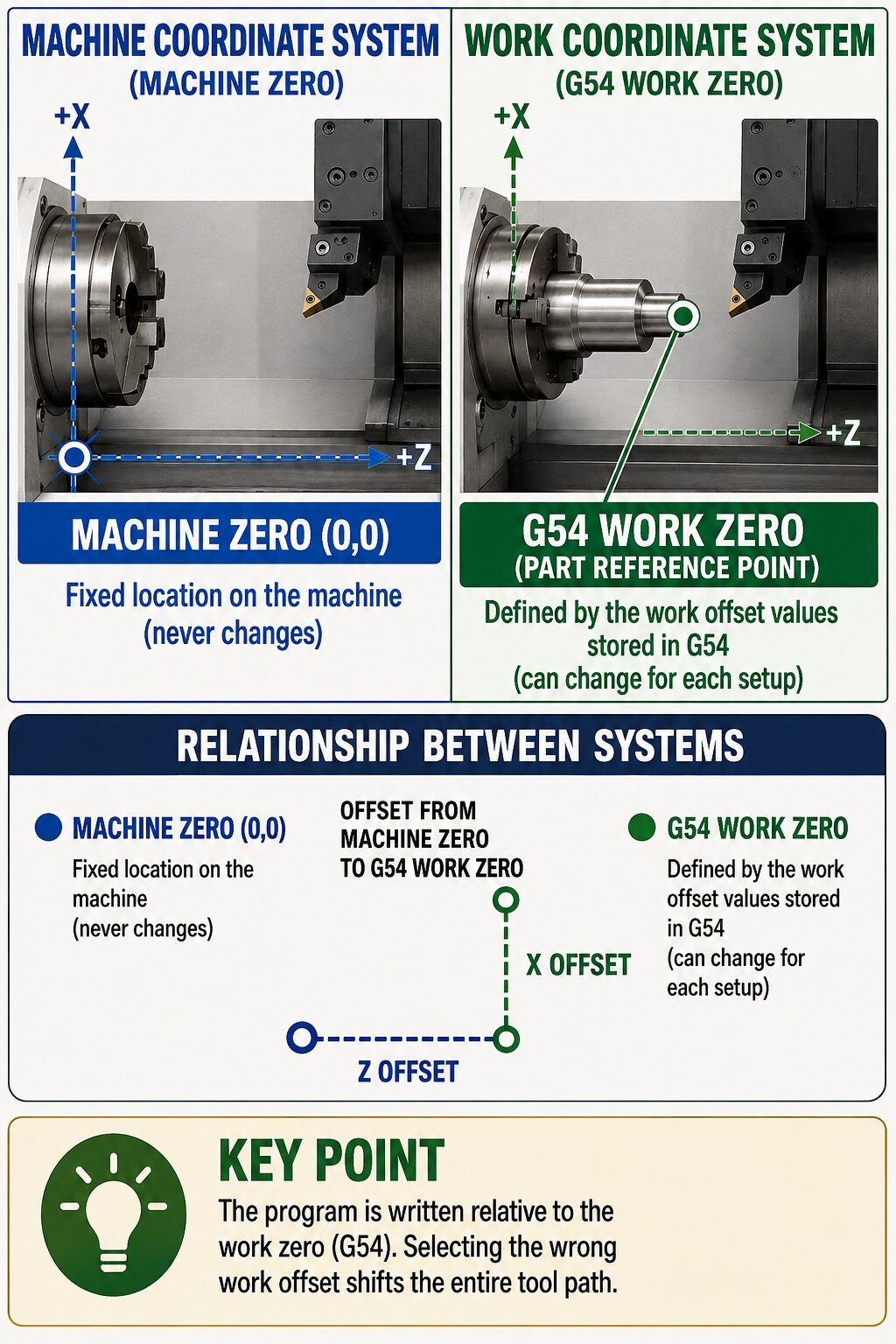 Before running a program, the operator must verify that the intended work offset is active. Selecting the wrong offset shifts the entire programmed tool path. A program can therefore be mathematically correct and still drive the diamond tool too deeply into the workpiece, cut at the wrong location, or miss the surface entirely.
Approaching the Workpiece Safely
The first approach to the workpiece should be conservative because the actual surface may not be located exactly where the program assumes it is. Small differences can result from workholding, part thickness, previous machining, or setup variation. A useful method is to mark the workpiece surface with a thin layer of red or blue marker so that very light tool contact can be seen easily. The tool is then brought toward the workpiece at a reduced feed rate while the operator watches the approach closely. During the initial approach, the tool should remain clear of the workpiece. Before the tool enters the expected cutting region, Feed Hold is used to pause automatic motion. This allows the operator to transition from programmed movement to a slow, controlled manual touch-off rather than allowing the machine to locate the surface at normal cutting speed.
Work Offset Shift and Z-Axis Touch-Off
Once the program is paused in a safe position, the operator uses the Work Offset Shift function and the Manual Pulse Generator (MPG) to move the tool carefully in the Z axis.
The Z axis is used because the purpose of the touch-off is to locate the workpiece surface along the cutting axis. Moving X instead would change the tool’s radial or centerline position rather than establish the axial location of the surface.
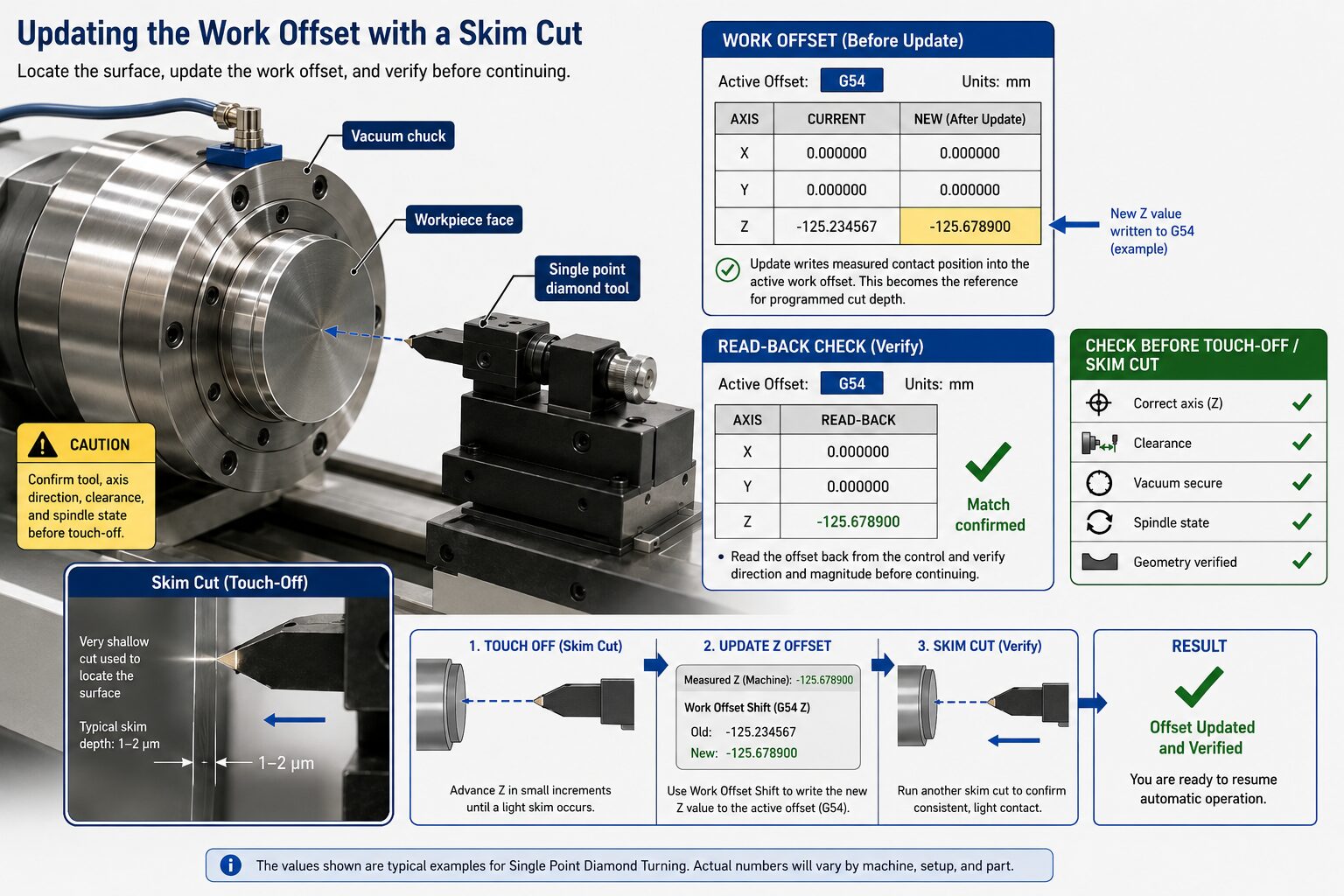
With the correct axis selected and the cutting environment established, the tool is advanced gradually toward the marked surface. The final movement should be extremely small. A very light skim cut, on the order of approximately one micrometer when appropriate for the machine and process, is enough to confirm that the cutting edge has reached the surface.
After contact is confirmed, the tool should be backed away slightly—typically by a few micrometers—so that the diamond edge is no longer touching the part.
Updating the Work Offset
The touch-off establishes the physical location of the actual workpiece surface. The active work offset can then be updated so that this measured position becomes the correct reference for the CNC program.
For example, if the located surface is intended to be Z0 in the part coordinate system, the work-offset value is adjusted so that the control reports Work Z = 0 at that physical surface location. The machine coordinate itself does not change. Instead, the relationship between the machine coordinate and the work coordinate is updated. The new value should be written to the intended work-offset register, such as G54, G55, or another active offset. The operator should then read the stored value back from the control and verify both its direction and magnitude before automatic machining resumes. Work offsets should be treated as controlled setup data. Record the value that changed, the reason for the change, and the measurement or touch-off that justified it.
Skim Cuts as a Verification Tool
A skim cut provides both a coordinate reference and physical evidence that the tool is contacting the part where expected. Because only a very small amount of material is removed, it reduces the risk of damaging the workpiece while the coordinate system is being established. The marked surface can also make the contact easier to see. A light removal of the marker indicates where the diamond has touched the workpiece and helps confirm that the contact occurred in the expected region. A skim cut is not automatically safe simply because the commanded movement is small. If the wrong axis is active, the work offset is incorrect, or the tool is positioned near a shoulder, chuck, or other feature, even a small movement can damage the diamond edge or workpiece. Before making the touch-off, confirm the active axis, tool geometry, workholding vacuum, spindle condition, clearances, and intended direction of movement.
Offset Errors and Their Consequences
An incorrect work offset changes the location of the entire programmed tool path relative to the workpiece. Depending on the direction and size of the error, the tool may cut too deeply, remove too little material, machine the surface at the wrong axial position, or collide with the workpiece or workholding hardware. Offset errors can also make later troubleshooting more difficult. If the first cut was made from an incorrect coordinate reference, the resulting surface error may be mistaken for a problem with tool height, tool radius, spindle position, or another process variable.
For this reason, coordinate corrections should always have a clear physical basis. Record what was changed, why it was changed, and what measurement justified the correction. SPDT setup becomes much more predictable when work offsets are based on measured part geometry rather than adjusted until the result simply appears correct.
This interactive demonstrates how an incorrect work offset shifts the entire programmed tool path relative to the workpiece. Adjust the offset error to see how the actual cut can become too shallow, too deep, or severe enough to create a collision risk, even when the CNC program itself is correct. The widget also shows why offset errors can complicate troubleshooting. A bad coordinate reference can produce surface errors that resemble problems with tool height, tool radius, spindle position, or other machine variables. Before changing those settings, verify the active work offset against a measured physical reference and document any correction that is made.
Offset Errors & Their Consequences
Move the offset error and watch the entire actual tool path shift while the intended path stays fixed.
If the cut is wrong, verify the active work offset and measured part location before blaming tool height, tool radius, spindle position, or another machine variable.