
Single Point Diamond Turning 1 Section12 Lessons1 Quiz12 Weeks
Lesson 4 – Diamond Tools and Tool Geometry
What You Will Learn
- Identify the important parts of a single-point diamond tool
- Explain tool nose radius, rake angle, clearance angle, and included angle
- Describe why diamond edge quality and waviness matter
- Read basic information from common diamond tool coding systems
- Select a tool geometry that matches the material and machining operation
The Diamond Cutting Edge
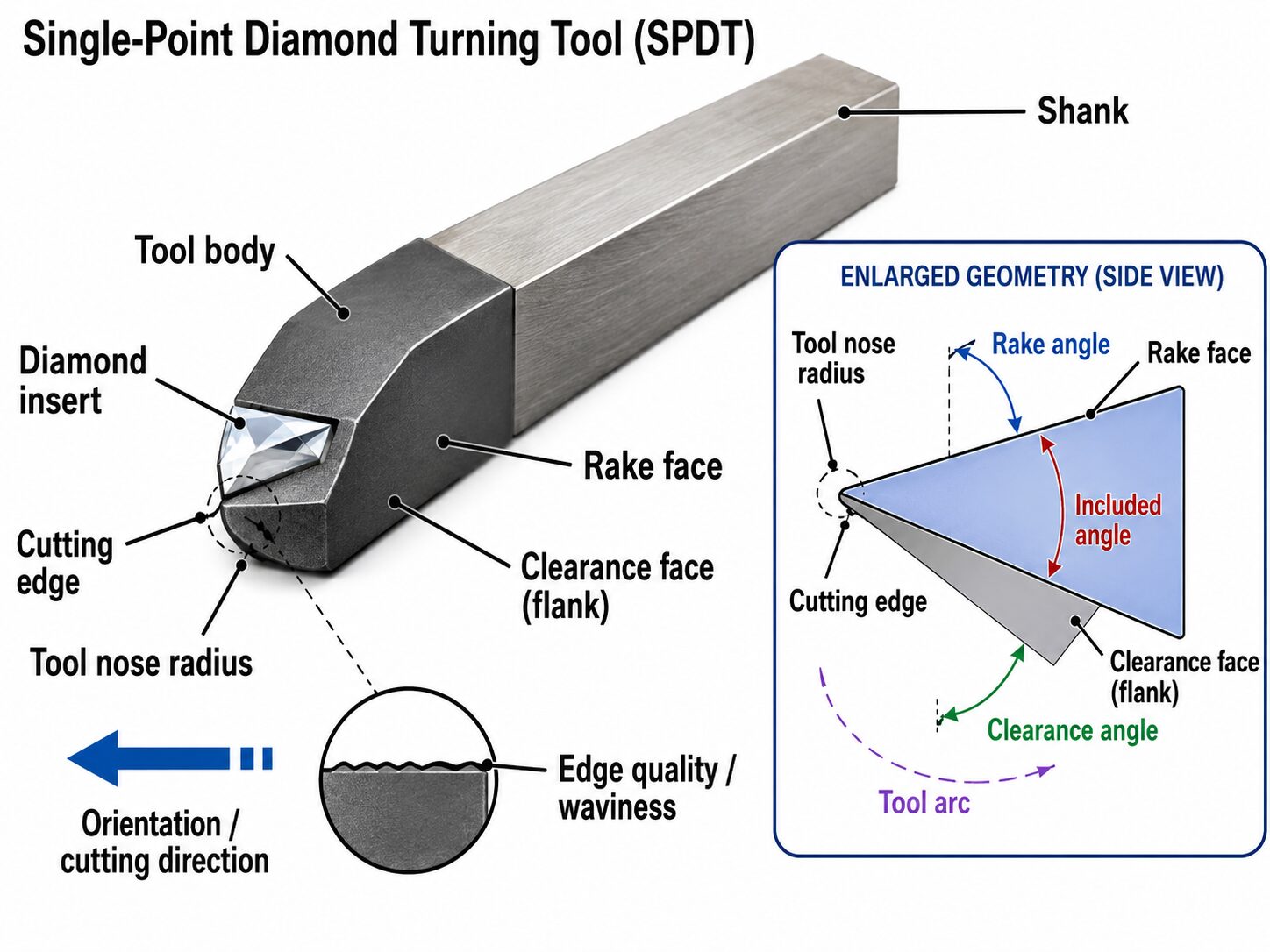
The diamond tool is the component that physically generates the surface, yet its performance depends on much more than diamond’s extreme hardness. A single-point tool has a precisely shaped cutting edge whose radius, rake, front clearance angle, included angle, edge waviness, orientation, and mounting geometry determine how it contacts the material. Because SPDT surfaces may be evaluated at nanometer-scale roughness levels, even very small imperfections in the cutting edge can be transferred into the workpiece.
The tool must also be mounted so that the intended portion of the cutting edge is presented correctly to the workpiece. A tool with the correct geometry but the wrong orientation may lack sufficient strength, rub instead of cut, or create form errors that are difficult to diagnose after machining.
Nose Radius and Tool Arc
The tool nose radius is one of the most important and recognizable dimensions of a diamond tool. A radius tool presents a curved cutting edge, while other tool forms may use a flat, split radius, facet, half radius, or sharp point depending on the machining operation. The nose radius influences the contact geometry between the tool and workpiece and affects the feed marks, often called scallops, that are generated on the finished surface.
Diamond tool specifications commonly include the nose radius and usable tool arc as part of the tool description. When selecting a radius, the operator must consider the shape of the surface, local curvature, cutting direction, desired surface finish, and whether the tool can maintain proper clearance throughout the programmed cutting path.
 Rake, Clearance, and Included Angle
Rake angle describes the orientation of the tool face relative to the cutting direction. Depending on the material and cutting conditions, a diamond tool may use zero rake, positive rake, or negative rake. Ductile materials such as aluminum, copper, brass, and nickel may require zero rake conditions where brittle infrared or semiconductor materials such as germanium, silicon, zinc selenide, and zinc sulfide require a negative rake.
Clearance angle prevents the portion of the tool under the cutting edge from rubbing against the newly generated surface. A tool may have a primary clearance angle, a secondary clearance angle, or a combination of clearance surfaces. The clearance geometry may also be cylindrical, conical, or another shape depending on the tool design.
The included angle describes the angular extent of the tool geometry surrounding the cutting edge. Rake, clearance, and included angle must work together. Changing one angle can affect the usable cutting arc, tool strength, or available clearance and may create interference during machining.
Edge Quality and Controlled Waviness
A diamond tool can have the correct nominal geometry and still be unsuitable for a demanding optical finish if the cutting edge contains waviness, chips, microscopic defects, or other irregularities. Diamond tool manufacturers therefore inspect and classify cutting-edge quality, often specifying maximum waviness or other measurements that describe how closely the actual edge matches the intended geometry. Lower waviness values generally indicate a more tightly controlled cutting edge.
Edge quality is important because the cutting edge acts like a very small master shape that is repeatedly swept across the workpiece. Irregularities in the edge can be reproduced as periodic or directional texture on the finished surface. Tool inspection data, geometry measurements, and manufacturer specifications should therefore be retained as part of the machining process record.
Reading Tool Coding Systems
Diamond tool coding systems compress a large amount of geometry and manufacturing information into a compact part number. Depending on the manufacturer, a tool code may identify diamond type, full or half radius, rake angle, primary clearance, clearance type, tool arc, waviness class, secondary clearance, shank or insert style, orientation, and shank size.
The exact letters, numbers, and positions used in the code vary among manufacturers, so each tool should be interpreted using the coding system supplied by its manufacturer. The important skill is not memorizing every possible code but learning to separate the code into categories and verify each part before installing the tool.
Two tools with similar-looking codes may have different rake angles, clearances, radii, cutting arcs, or orientations. These differences can significantly change cutting behavior and may determine whether the tool can safely machine the programmed surface.
Selecting Geometry for the Operation
Tool selection begins with the material being cut and the geometry of the surface being machined. Face turning, outside-diameter turning, hole boring, concave surfaces, convex surfaces, aspheric surfaces, and freeform operations may require different tool orientations, nose radii, or usable cutting arcs. The tool must be mounted at an orientation that provides adequate clearance while keeping the nose radius correctly positioned relative to the surface.
The selected geometry must also allow the tool to follow the complete programmed path without the tool body, shank, or noncutting portions of the diamond contacting the workpiece. This becomes especially important when machining steep slopes, strongly curved surfaces, deep concave features, or complex freeforms.
Before machining, the operator should verify the vendor-supplied radius and tool geometry against the tool-setting or measurement system. If the measured cutting-edge contour does not agree closely with the documented geometry, the difference should be investigated before machining begins rather than allowing the program to compensate for an unknown tool condition. In SPDT, accurate tool geometry must be established before accurate tool offsets and surface geometry can be established.
Interactive Tool Code and Geometry Selector
This activity shows how a diamond tool code can be separated into individual geometry categories such as radius, rake angle, clearance, orientation, and shank size. It also demonstrates how the machining operation and workpiece shape affect which tool geometry should be checked before the tool is installed. The goal is not to memorize one coding system, but to learn how to decode the tool systematically, verify each value with the correct manufacturer chart, and confirm that the selected geometry matches the operation before machining begins.
Tool Code & Geometry Selector
Practice reading a tool code by separating it into geometry categories, then connect the tool geometry to the material and machining operation.