
Single Point Diamond Turning 1 Section12 Lessons1 Quiz12 Weeks
Lesson 6 – Machine Controls and Setup
What You Will Learn
- Identify the main controls used to operate an SPDT machine
- Explain the functions of servos, hydraulics, vacuum, coolant, and automatic mode
- Use jog controls and the Manual Pulse Generator to position machine axes
- Explain the purpose of feed hold, cycle start, cycle stop, and the emergency stop
- Describe the basic checks that should be completed before machine motion begins
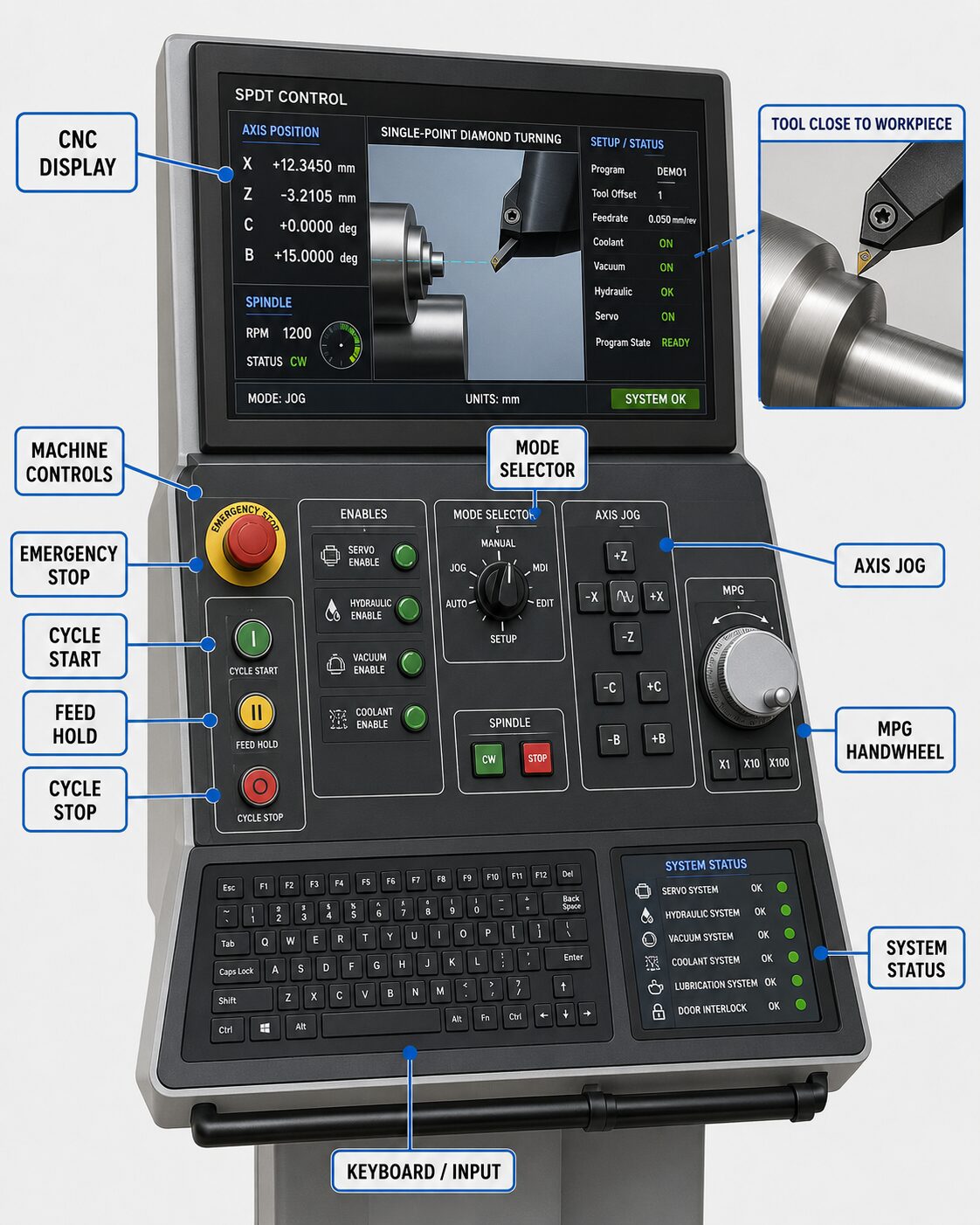 The Operator Interface
An SPDT machine is typically operated from a control station that combines a CNC display, machine-control buttons, and a keyboard, touchscreen, or other input device. Although screen layouts and control names vary among manufacturers, the basic operating sequence is similar. The operator enables the required machine systems, selects an operating mode or axis, positions the machine manually when necessary, loads or selects a program, verifies the setup, and then begins the automated machining cycle.
Before using any control, the operator should understand the machine’s current state and the position of the tool relative to the workpiece. A command that is safe when the tool is several millimeters away can cause a collision when the cutting edge is close to the surface. Even a movement of only a few micrometers can damage a diamond tool or precision workpiece if the wrong axis, direction, or increment is selected.
Servos and Hydraulics
The servo system controls the powered movement of the machine axes. When the servos are enabled, the X and Z axes can respond to commands from the CNC controller, jog controls, or Manual Pulse Generator. The servos use feedback from the machine’s position-measuring system to control axis movement with extremely high precision.
Some ultra-precision machines also use hydraulic or hydrostatic systems to support low-friction movement of the linear axes. These systems help the slides move smoothly and consistently while minimizing mechanical contact and positioning error. Before enabling machine motion, the operator should confirm that the machine systems are operating normally and that the motion area is clear. A useful pre-motion habit is to confirm the selected axis, verify that the tool has adequate clearance from the chuck and workpiece, remove unnecessary gauges or setup hardware from the motion path, and know which control will immediately stop motion if the machine behaves unexpectedly.
Vacuum and Coolant Controls
Vacuum workholding is commonly used in SPDT because it can secure a precision workpiece to the spindle chuck without introducing the mechanical distortion associated with conventional clamping. The vacuum system should be operating correctly and providing sufficient holding force before the spindle is accelerated to machining speed. A loss of vacuum during rotation can allow the workpiece to move or separate from the chuck, creating a serious equipment and safety hazard.
Coolant, oil, or mist controls allow cutting fluid to be supplied to the cutting zone. Depending on the material and machining process, the fluid can help control temperature, carry chips away from the cutting edge, reduce contamination, and improve cutting stability. Some machines also provide a controlled air supply for removing loose chips from the tool or workpiece. Compressed air should be directed carefully so that debris is not blown into spindle components, guideways, metrology equipment, or finished optical surfaces.
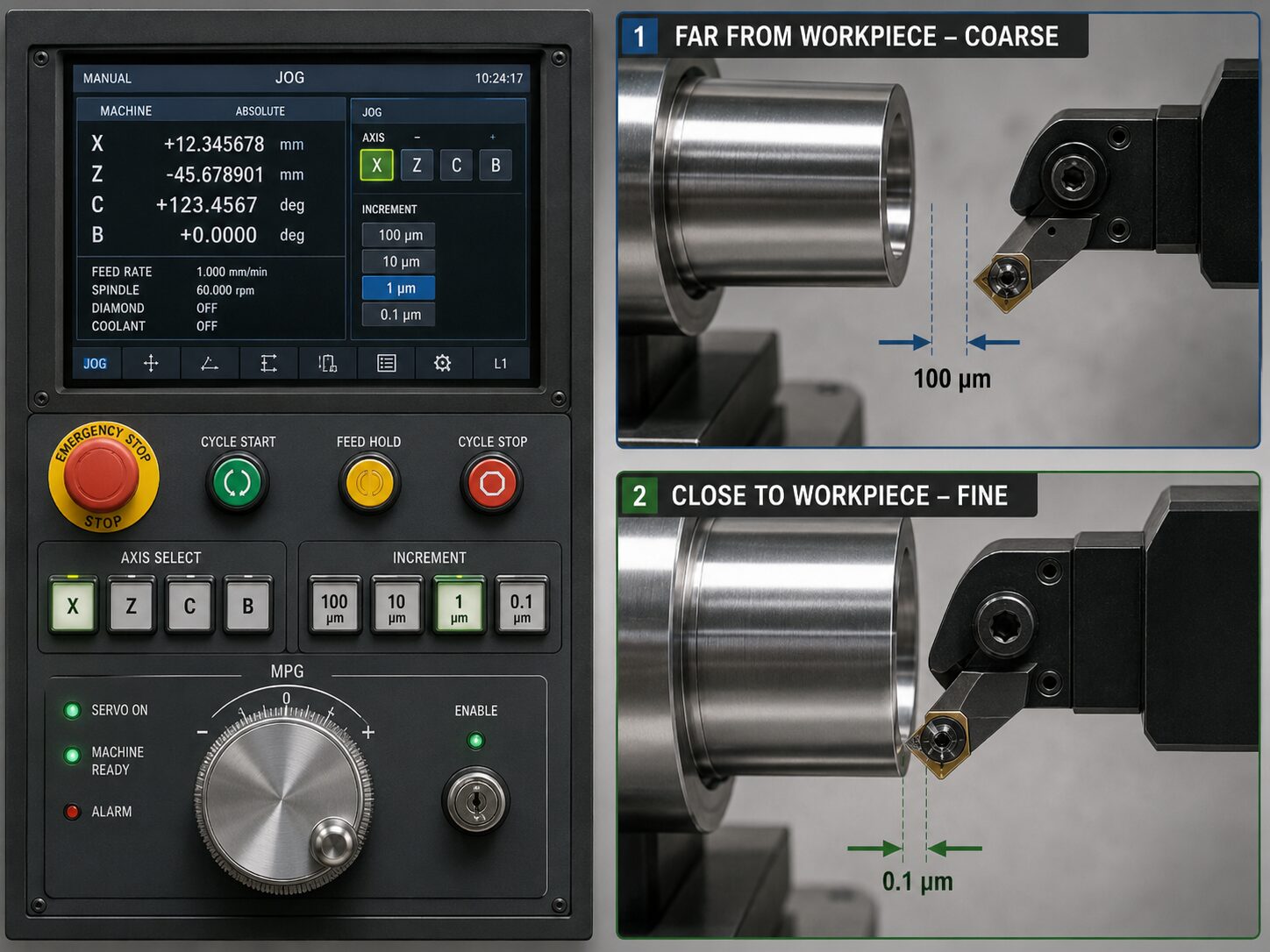 Jog Mode and the Manual Pulse Generator
Manual positioning is commonly performed using jog controls or a Manual Pulse Generator (MPG), often called the hand wheel. Jog mode allows an axis to move manually at a selected speed, while the MPG allows the operator to command small, controlled movements by rotating a hand wheel. The operator selects the axis to be moved and chooses an increment that determines how much motion occurs for each hand-wheel step.
Large increments can be useful when the tool is far from the workpiece, but progressively smaller increments should be selected as the tool approaches the cutting surface. Fine positioning is especially important during tool setup, touch-off, workpiece alignment, and operations performed near cameras, gauges, or other sensitive equipment.
The active axis and direction should always be confirmed before motion begins. Moving the X axis when Z motion was intended, for example, can change the tool’s centerline position or drive the cutting edge into the workpiece. When working close to the surface, operators should make one controlled movement at a time and verify the result before continuing.
Cycle Start, Feed Hold, Cycle Stop, and Auto
Auto mode allows the CNC controller to execute the loaded machining program. Once the setup has been verified and the machine is ready, Cycle Start begins or resumes the programmed sequence of movements and machine functions. Because an automated program may command several axes and machine systems in rapid succession, Cycle Start should only be used after the operator has confirmed that the correct program, work offset, tool position, spindle settings, and workholding conditions are in place.
Feed Hold temporarily pauses programmed axis motion in a controlled manner. It is especially useful during the first run of a new setup because the operator can reduce the feed rate, observe the tool as it approaches the workpiece, and pause the program before contact if the position does not appear correct. Cycle Stop ends or interrupts the automatic machining cycle according to the machine controller’s operating logic. The first approach to a newly installed workpiece should normally be performed conservatively. Reduced feed rates and careful observation give the operator time to detect an incorrect offset, tool position, program command, or setup condition before it produces a collision or damages the workpiece.
Emergency Stop
The Emergency Stop, or E-Stop, is used when machine motion or operation must be stopped immediately because an unsafe condition has developed. Activating the E-Stop typically stops machine motion and disables the systems responsible for axis movement. Every operator should locate and understand the E-Stop before operating the machine.
The E-Stop is a safety device rather than a normal method of stopping a machining cycle. Normal operations should be controlled with Cycle Stop, Feed Hold, or other appropriate machine controls whenever possible. Careful setup, conservative approach speeds, and continuous awareness of the tool and workpiece help prevent conditions that require an emergency stop. If an unsafe situation does develop, protecting people and equipment takes priority over completing the machining cycle.
Pre-Motion Setup Checks
Before machine motion begins, the operator should verify that the correct tool and workpiece are installed and that all mounting surfaces are clean. Vacuum workholding should be checked, and workpiece runout and rotational balance should be within acceptable limits before the spindle reaches machining speed. Cameras, indicators, gauges, and other setup equipment should be removed from possible collision paths unless they are intentionally being used.
The operator should also confirm that the correct program and work offset are active, the intended axis and jog increment are selected, spindle settings are appropriate, coolant or mist is ready, and the feed-rate override is suitable for the next operation. Tool position should be checked carefully before automatic movement begins. These checks may seem repetitive, but repetition is valuable in ultra-precision machining because many serious failures begin with a small incorrect assumption. A consistent pre-motion routine turns those assumptions into conditions that can be observed and verified before an expensive diamond tool, precision optic, spindle, or machine component is placed at risk.
Interactive Machine Controls Explorer
This activity introduces the main controls used to operate an SPDT machine. Click each numbered control to see what it does, when it is used, and what the operator should verify before using it. The explorer emphasizes safe manual positioning, correct use of Cycle Start, Feed Hold, Cycle Stop, and the Emergency Stop, and the importance of confirming the axis, direction, workholding, and machine state before motion begins.
SPDT Machine Controls Explorer
Click a numbered control on the panel. The explanation on the right will change to show what the control does, when it is used, and what to check before using it.
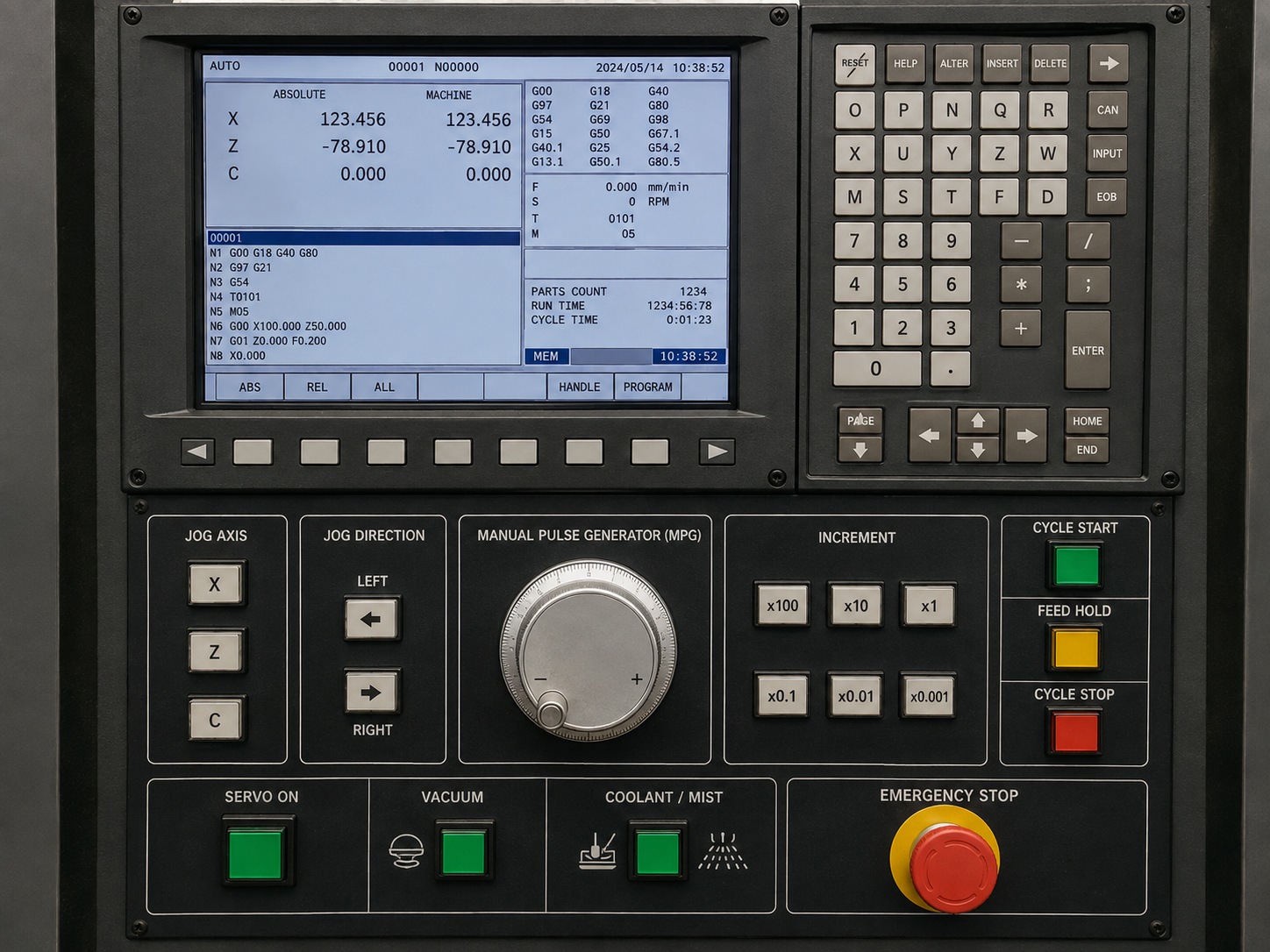
1. Jog Axis Select
Selects which machine axis will move during manual positioning.