
Single Point Diamond Turning 1 Section12 Lessons1 Quiz12 Weeks
Lesson 7 – Mounting and Setting the Diamond Tool
What You Will Learn
- Mount a diamond tool in the correct orientation for the machining operation
- Explain why clean mounting surfaces and proper clamping are important
- Use an optical tool-setting camera to locate the diamond tip
- Compare manual and automatic tool-setting methods
- Verify the tool nose radius and assign the correct tool offset
Preparing to Mount the Tool
Diamond-tool mounting begins before the tool is placed in the holder. Old tool offsets should be recorded or cleared so that the operator can distinguish existing values from the offsets that will be established for the new tool. Tools should also be identified by their intended operation, such as outside-diameter turning, face turning, or boring, because tools with similar geometry may be designed for very different cutting directions.
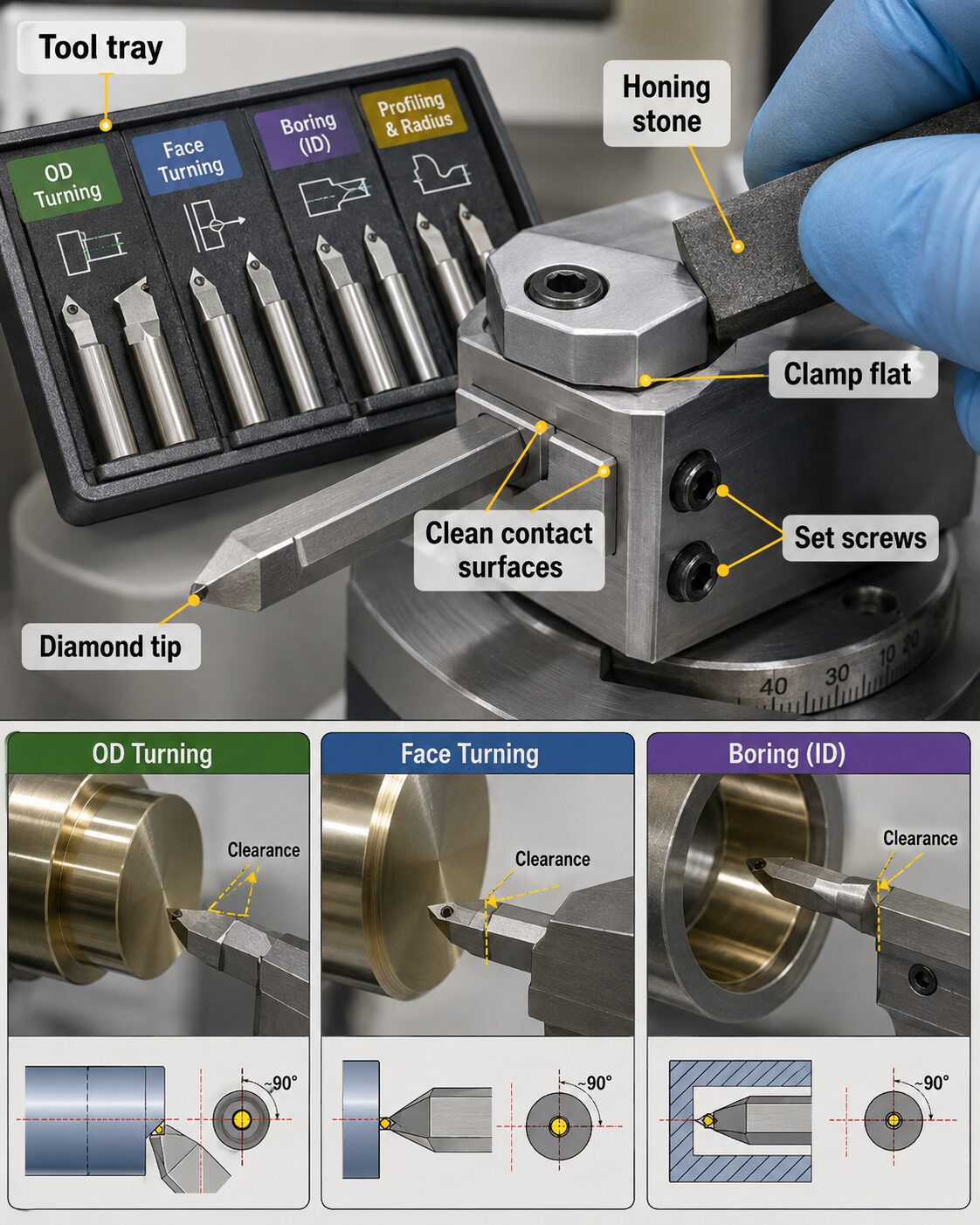 Mounting surfaces must be clean, flat, and free from burrs because even a small amount of debris beneath the tool shank or clamp can change the position of the diamond cutting edge. If necessary, a fine honing stone can be used carefully to remove minor burrs from the retainer or tool-shank contact surfaces. The clamp should seat flat against the tool before the smaller set screws are tightened to secure the shank.
Orientation and Clearance
The diamond must be oriented so that the cutting edge maintains adequate clearance throughout the machining operation. A face-turning tool, an outside-diameter turning tool, and a boring tool may require different orientations even when their nose radii are similar. The tool nose should also be positioned so that its geometry is appropriate for the direction and surface being cut.
Incorrect orientation can cause the tool body to rub against the workpiece, place excessive load on the wrong portion of the cutting edge, or prevent the programmed geometry from being generated correctly. Tool orientation should therefore be determined from the machining operation, the tool geometry, and the machine setup rather than from appearance alone.
The Optical Tool-Setting Camera
Many SPDT machines use an optical tool-setting camera to determine the precise location and geometry of the diamond cutting edge. The camera may be installed on a repeatable kinematic mount so that it returns to a consistent position each time it is placed on the machine. Maintaining a stable camera temperature also helps reduce positional changes caused by thermal expansion.
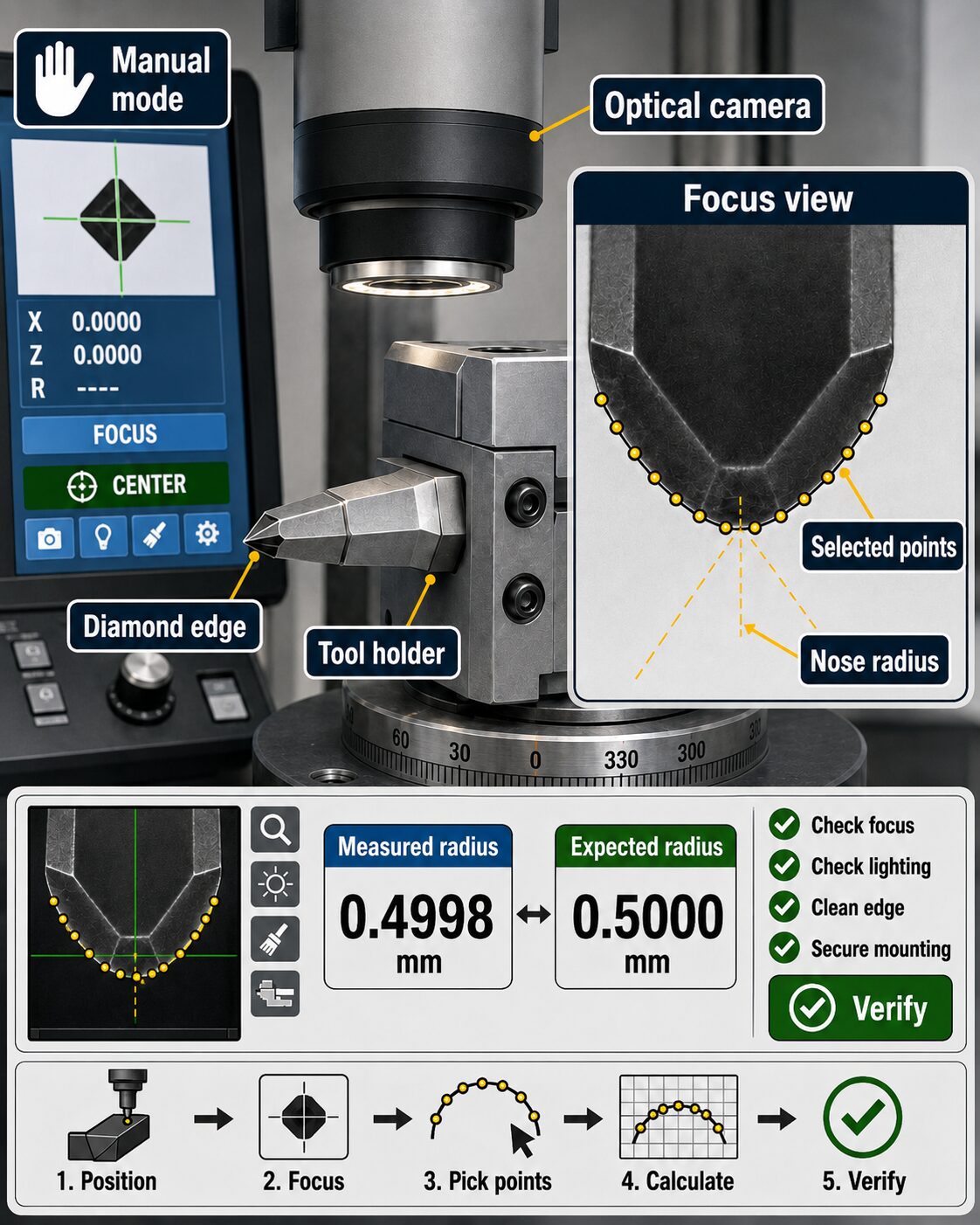
The operator uses jog controls or the Manual Pulse Generator to position the tool beneath the camera. Coaxial illumination can be used to view and focus on the top surface of the tool, while backlighting makes the outline of the diamond nose easier to see. Lighting should be adjusted until the cutting edge and nose-radius contour are sharp and clearly defined.
 Manual Tool Setting
During manual tool setting, the operator opens the machine’s optical tool-setting function, selects the manual measurement mode, positions the tool beneath the camera, and brings the diamond edge into focus. Measurement points are then selected along the visible contour of the tool nose. Using several well-spaced points across a large portion of the visible nose radius generally produces a more reliable contour calculation than using only a few points in a small area. The control uses these selected points to calculate the position and radius of the diamond nose.
The measured nose radius should then be compared with the value supplied for the tool. The two values should agree closely. If the measurement is inconsistent or significantly different from the expected radius, the operator should repeat the measurement and check the focus, lighting, cleanliness of the cutting edge, and security of the tool mounting before accepting the result.
Automatic Tool Setting
Automatic tool setting uses the same basic physical setup as manual measurement. The diamond must be mounted correctly, positioned beneath the camera, and brought into clear focus. Once the appropriate automatic tool-setting function is selected, the software identifies and measures the tool geometry with less manual point selection by the operator.
Automatic measurement can improve speed and repeatability, but it does not eliminate the need for verification. Incorrect focus, poor image contrast, contamination on the cutting edge, an improperly mounted tool, or selection of the wrong tool number can still produce an incorrect result. The measured values should therefore be compared with the tool specifications and, when available, previous measurements of the same tool.
Assigning and Verifying the Tool Offset
After the tool geometry has been measured, the resulting offset is assigned to the appropriate tool number in the machine’s tool-offset library. The tool number called by the CNC program must match the offset assigned to the installed tool. If the wrong offset is selected, the control may position the cutting edge using geometry that belongs to a different tool.
The tool-setting measurement should be repeated to verify that the result is consistent before machining begins. Repeated measurements are especially important when an incorrect offset could damage the diamond tool, the workpiece, or the optical surface. Careful verification during setup takes only a small amount of additional time but can prevent costly errors later in the machining process.